Introduction
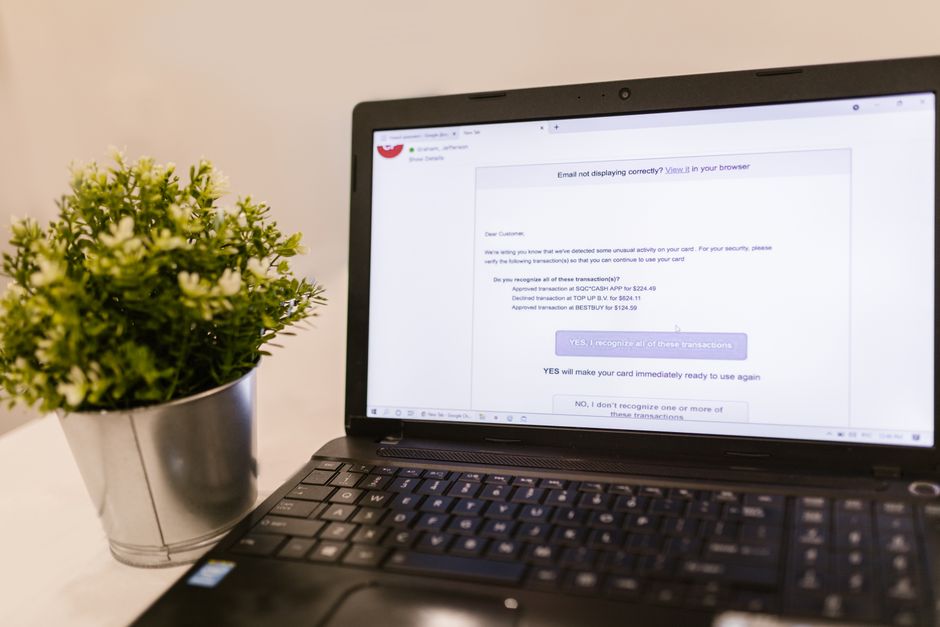
Imagine receiving an email that looks like it’s from your bank, asking you to confirm your details. You’re worried, but what if it’s really from them? Phishing is a common cyberattack tactic that tricks you into giving away personal information.
What Is Phishing?
Phishing is when cybercriminals send fraudulent messages, often via email, pretending to be a reputable source. Their goal? To steal your sensitive data, like passwords or credit card numbers.
Why Is Phishing So Effective?
Phishing scams work because they prey on our emotions—fear, urgency, or curiosity. A message that claims your account will be locked unless you act quickly can compel you to click on harmful links.
Types of Phishing
Phishing comes in various forms. Here are some common types:
- Email Phishing: The classic form, where scammers send emails that look real.
- SMS Phishing (Smishing): Similar to email phishing, but through text messages.
- Voice Phishing (Vishing): Scammers call you, pretending to be from a legitimate organization.
- Clone Phishing: A previous legitimate email is duplicated, with malicious links attached.
How to Recognize Phishing Attempts
Spotting a phishing attempt can be tricky, but there are clues you can look for. Here are some warning signs:
- Check the Sender’s Email Address: Phishers often use addresses that look similar to legitimate ones. For example, look out for little changes like extra letters or different domains.
- Urgent Language: Be wary of emails that insist you act quickly. Scammers often create a false sense of urgency.
- Spelling and Grammar Mistakes: Many phishing emails are poorly written. If it looks unprofessional, think twice before responding.
- Links and Attachments: Hover over links to see where they really lead before clicking. Never open unexpected attachments!
Steps to Protect Yourself from Phishing
Staying safe from phishing attacks doesn’t have to be complicated. Follow these simple steps:
- Think Before You Click: Don’t click on links or download attachments from unknown sources.
- Use Strong Passwords: A robust, unique password for each account can keep attackers at bay.
- Enable Two-Factor Authentication: This adds an extra security layer. Even if someone gets your password, they’ll need a second piece of info to access your account.
- Educate Yourself: Staying informed about the latest phishing techniques can help you recognize threats.
- Report Phishing Attempts: If you receive a suspicious email, report it to your email provider.
What to Do If You Fall Victim
If you accidentally click on a phishing link or share your information, don’t panic. Here are the steps to take immediately:
- Change Your Passwords: If you suspect your account is compromised, change your passwords right away.
- Contact Your Bank or Credit Card Company: Let them know what happened to safeguard your financial information.
- Enable Fraud Alerts: Consider placing a fraud alert on your credit reports to help protect against identity theft.
- Monitor Your Accounts: Regularly check your bank statements and online accounts for suspicious activity.
Conclusion
Phishing attacks are on the rise, making it crucial for everyone to stay educated and alert. Remember, if something feels off, trust your instincts.
Protecting yourself online doesn’t require you to be a tech expert. With a little caution and awareness, you can help keep your personal information safe from scammers.