Introduction
Have you ever received an email that looked perfectly normal, only to realize later it was trying to trick you? Welcome to the world of phishing. This sneaky scam targets anyone and everyone, hoping to catch unsuspecting individuals. In this post, we’ll uncover what phishing is, how to recognize it, and how you can protect yourself.
What is Phishing?
Phishing is a type of cybercrime where attackers impersonate legitimate organizations to steal sensitive information. This could be anything from your login credentials to your financial information. They often do this by sending fake emails that direct you to fraudulent websites.
How Phishing Works
The attacker crafts an email that seems genuine. It might look like it’s from your bank, a social media platform, or another trusted source. These emails often create a sense of urgency—maybe claiming there’s a problem with your account—pressuring you to take immediate action.
Common Types of Phishing
There are various forms of phishing scams, and knowing about them can help you stay safe:
- Email Phishing: The most common form, where scammers send fake emails to lure you into giving up information.
- Spear Phishing: This is targeted phishing aimed at specific individuals or organizations. The attacker may use personal details to make the email look credible.
- Whaling: A type of spear phishing that targets high-profile individuals, like executives or important figures in a company.
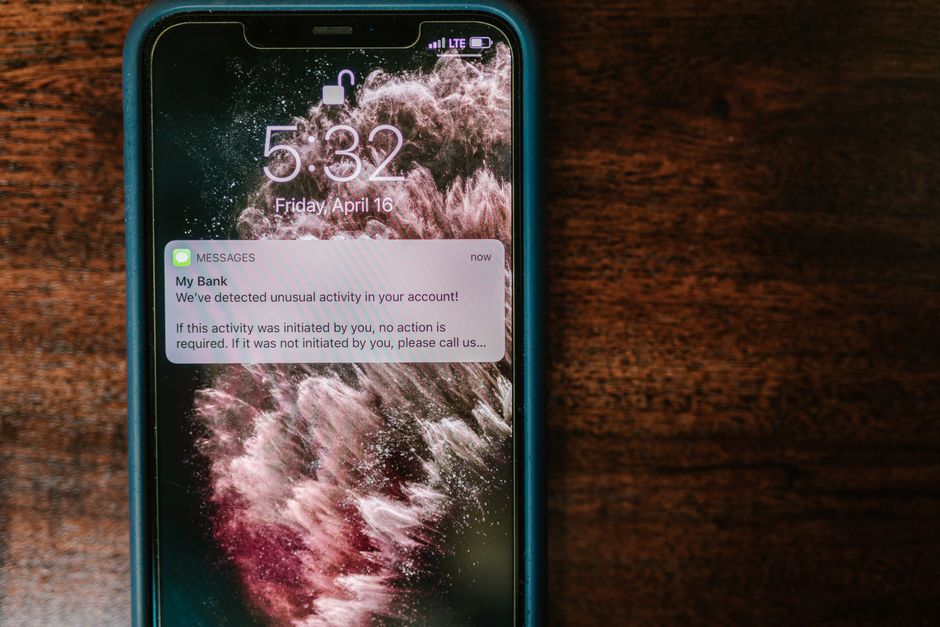
- SMS Phishing (Smishing): Phishing done through text messages, trying to trick you into clicking links or sharing personal information.
- Voice Phishing (Vishing): This involves phone calls where the scammer pretends to be from a legitimate organization to steal personal data.
Signs of a Phishing Email
So how do you recognize these deceptive emails? Here are some signs to watch out for:
- Generic Greetings: Phishing emails often start with vague greetings like “Dear Customer” instead of your name.
- Strange Email Addresses: Check if the sender’s email matches their organization’s official domain. If not, it’s likely a scam.
- Urgent Language: Be wary of emails that create a sense of panic or urgency, pushing you to act without thinking.
- Requests for Personal Information: Legitimate companies rarely ask for sensitive data via email.
- Suspicious Links: Hover over links to see where they lead. If the URL looks odd or doesn’t match the company’s website, don’t click it!
How to Protect Yourself
Preventing phishing attacks is all about being cautious and informed. Here are some helpful tips:
- Verify the Source: If you receive a suspicious email, don’t click any links. Instead, contact the company directly using official contact methods.
- Look for HTTPS: When entering sensitive information online, ensure the URL starts with “https://” which indicates a secure connection.
- Use Two-Factor Authentication: This adds an extra layer of security to your accounts. Even if a scammer gets your password, they’ll still need a second form of verification.
- Keep Software Updated: Regularly update your antivirus programs and other software to protect against known vulnerabilities.
- Educate Yourself: Stay informed about the latest phishing techniques. The more you know, the harder it is for scammers to catch you off guard.
What to Do If You Fall for a Phishing Scam
Even the most cautious people can become victims. If you think you’ve fallen for a phishing scam, act quickly:
- Change Your Passwords: If you gave away your login information, change your passwords immediately.
- Notify Your Bank: If financial information was involved, contact your bank or credit card company right away.
- Report It: Report the phishing attempt to the appropriate authorities, like the Federal Trade Commission (FTC) or your local cybersecurity agency.
Conclusion
Phishing scams are increasingly sophisticated and can happen to anyone. By knowing what to look for and how to respond, you can protect yourself from these deceptive tactics. Remember, it’s always better to take a moment to verify than to rush into a decision that could jeopardize your personal information.